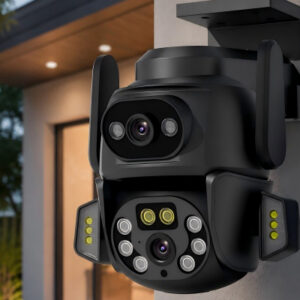
Ein schwaches WLAN-Signal ist eines der häufigsten Probleme, mit denen Benutzer einer WLAN-Außenkamera konfrontiert sind. Es kann zu Videoverzögerungen kommen, Trennung, verzögerte Benachrichtigungen, and even failed recordings. Für moderne Überwachungssysteme wie die intelligente WLAN-Überwachungskamera ANJIA Q820EM für den Außenbereich, Eine stabile Konnektivität ist unerlässlich, um Echtzeitschutz und unterbrechungsfreie Überwachung zu gewährleisten.
Das Verständnis der Ursachen für ein schwaches Signal und die Anwendung der richtigen Optimierungsmethoden können die Leistung jeder drahtlosen WLAN-Außenkamera oder WLAN-Überwachungskamera für den Außenbereich, die in privaten oder geschäftlichen Umgebungen verwendet wird, erheblich verbessern.
Why outdoor WiFi cameras often lose signal
Im Gegensatz zu Innengeräten, ein WLAN-Außenkamera operates in a more complex environment. Wände, Distanz, Wetterbedingungen, und Störungen durch andere Geräte können die Signalstärke beeinträchtigen.
In vielen Fällen, the camera is installed far from the router, which reduces signal quality. Metallstrukturen, dicke Betonwände, oder sogar Hindernisse im Freien wie Bäume können die Verbindung weiter schwächen. Wenn das Signal instabil wird, Die Kamera lädt das Video möglicherweise nicht reibungslos hoch oder löst verzögerte Warnungen aus. Für fortgeschrittene Modelle wie die intelligente WLAN-Überwachungskamera ANJIA Q820EM für den Außenbereich, Eine stabile Verbindung ist von entscheidender Bedeutung, da sie Echtzeit-KI-Erkennung und PTZ-Tracking-Funktionen unterstützt.
Verbessern Sie die Platzierung des Routers für eine stärkere Abdeckung
Eine der einfachsten, aber effektivsten Lösungen ist die Anpassung der Router-Platzierung. Viele Nutzer platzieren ihren Router in einer Ecke oder einem geschlossenen Raum, was die Signalverteilung einschränkt.
Um die Leistung zu verbessern, Der Router sollte an einem zentralen und erhöhten Standort positioniert werden. Dadurch kann sich das Signal gleichmäßig zum Installationsbereich der WLAN-Überwachungskamera im Außenbereich ausbreiten. Wenn die Kamera im Freien installiert ist, Versuchen Sie sicherzustellen, dass zwischen dem Router und dem Gerät weniger physische Barrieren bestehen. Selbst kleine Anpassungen bei der Platzierung können die Konnektivität erheblich verbessern.
Reduzieren Sie Störungen durch andere Geräte
Eine drahtlose WLAN-Außenkamera teilt sich häufig die Bandbreite mit mehreren Geräten wie Smartphones, Laptops, und Smart-Home-Systeme. Dies kann zu einer Überlastung des Netzwerks führen.
Um Störungen zu reduzieren, es wird empfohlen:
- Beschränken Sie unnötige angeschlossene Geräte
- Verwenden Sie nach Möglichkeit ein dediziertes WLAN-Band für die Kamera
- Stellen Sie den Router nicht in der Nähe von Mikrowellenherden oder schweren elektronischen Geräten auf
For high-performance systems like ANJIA Q820EM, Die Aufrechterhaltung einer sauberen Netzwerkumgebung sorgt für eine reibungslosere Echtzeit-Videoübertragung.
Nutzen Sie WLAN-Extender oder Mesh-Systeme
If the camera is installed far from the router, Ein WLAN-Extender oder ein Mesh-Netzwerksystem kann die Signalstärke erheblich verbessern.
Ein WLAN-Extender hilft dabei, das Signal an Außenbereiche weiterzuleiten, während ein Mesh-System mehrere Abdeckungspunkte auf dem gesamten Grundstück bietet. Dies ist besonders bei großen Häusern nützlich, Lagerhäuser, oder Gewerbeflächen mithilfe eines WLAN-Kamerasystems für den Außenbereich. Durch die Stärkung der Abdeckung, Die WLAN-Überwachungskamera für den Außenbereich kann auch über große Entfernungen ein stabiles Videostreaming aufrechterhalten.
Optimieren Sie die Installationsposition der Kamera
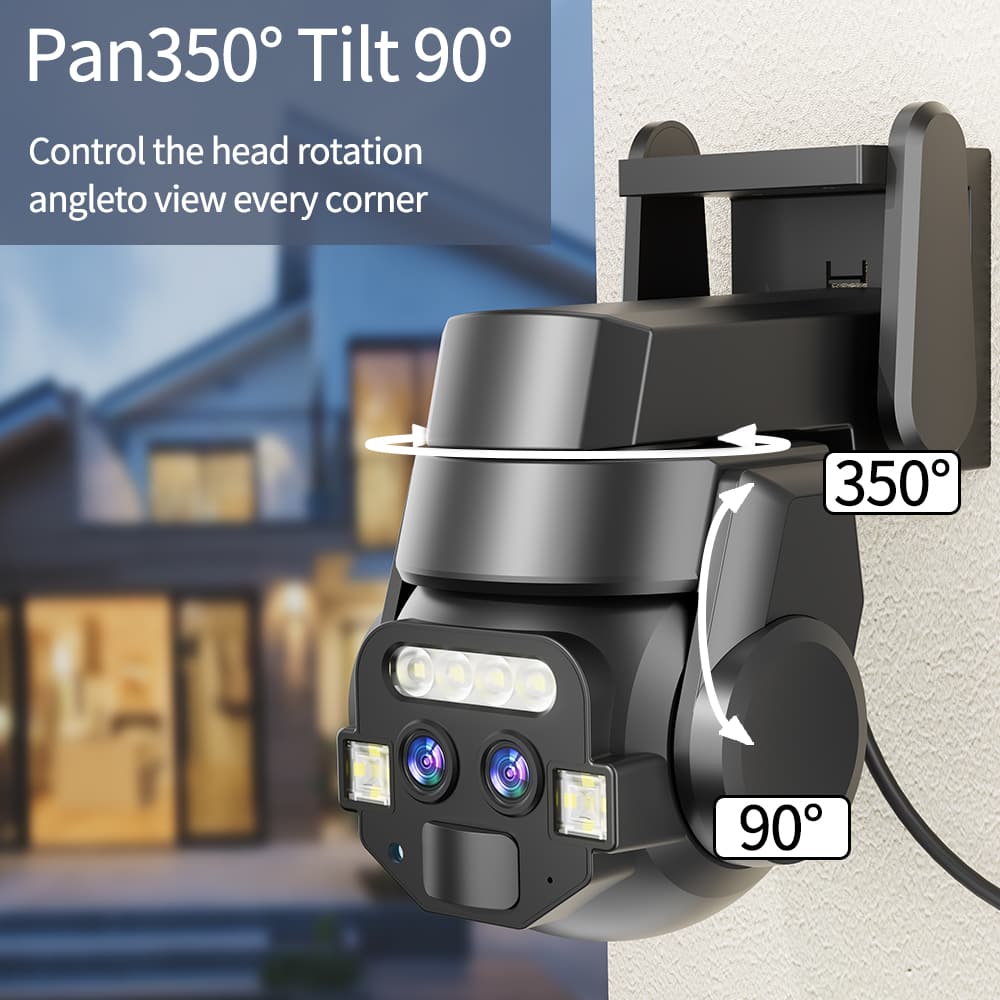
Auch Installationshöhe und -winkel wirken sich auf die Signalqualität aus. Die intelligente WLAN-Überwachungskamera ANJIA Q820EM für den Außenbereich unterstützt eine horizontale PTZ-Drehung um 350° und eine vertikale PTZ-Drehung um 90°, ermöglicht eine flexible Positionierung.
Zur Verbesserung der Signalstabilität:
- Installieren Sie die Kamera in angemessener Entfernung vom Router
- Stellen Sie es nicht hinter dicken Wänden oder Metallbarrieren auf
- Position it where signal reflection is minimal
Eine ordnungsgemäße Installation verbessert nicht nur die Konnektivität, sondern erhöht auch die Erkennungsgenauigkeit.
Switch to a stronger frequency band
Viele moderne Router unterstützen sowohl das 2,4-GHz- als auch das 5-GHz-Band. The 2.4GHz band offers better range, während 5 GHz eine höhere Geschwindigkeit, aber eine kürzere Distanz bietet. For most wireless outdoor WiFi camera setups, Das 2,4-GHz-Band ist über größere Entfernungen stabiler. If the camera supports dual-band connectivity, Die Auswahl des geeigneten Bandes kann dazu beitragen, Verbindungsprobleme zu reduzieren.
Check firmware and app optimization
Auch veraltete Firmware kann zu einer instabilen Leistung führen. Hersteller wie ANJIA optimieren regelmäßig die Systemleistung für eine bessere Netzwerkverarbeitung.
Using the CareCam Pro app, Benutzer können sicherstellen, dass die Kamera-Firmware auf dem neuesten Stand ist. Dies trägt zur Verbesserung der Verbindungsstabilität bei, Verzögerung reduzieren, and enhance AI detection response time.
ANJIA Q820EM Leistungsvorteil
Even under weak network conditions, Die WLAN-Überwachungskamera ANJIA Q820EM für den Außenbereich ist darauf ausgelegt, durch optimierte Hardware- und Softwareintegration einen stabilen Betrieb aufrechtzuerhalten.
Es verfügt über:
- Intelligente Personenerkennung mit Echtzeitverfolgung
- Automatische 360°-PTZ-Rotation für eine vollständige Bereichsabdeckung
- Vollfarb-Nachtsichtgerät mit zwei Lampen und einer Sichtweite von bis zu 20 m
- Zwei-Wege-Audio über integriertes Mikrofon und Lautsprecher
- TF-Kartenspeicher bis zu 128 GB und optionaler Cloud-Speicher
- IP66 wasserdichter und staubdichter Schutz
- Geringer Stromverbrauch unter 15 W
Diese Funktionen stellen sicher, dass die Kamera auch in Außenumgebungen, in denen die Netzwerkbedingungen schwanken können, weiterhin zuverlässig funktioniert.
Abschluss:
Die Behebung von Problemen mit einem schwachen WLAN-Signal bei einer WLAN-Außenkamera erfordert eine Kombination aus ordnungsgemäßer Installation, Netzwerkoptimierung, und Hardware-Support. Durch die Verbesserung der Router-Platzierung, Reduzierung von Interferenzen, Verwendung von Signalverstärkern, und Auswahl des richtigen Frequenzbandes, Benutzer können die Leistung erheblich steigern.
Die intelligente WLAN-Überwachungskamera ANJIA Q820EM für den Außenbereich ist für eine stabile Überwachung auch unter schwierigen Bedingungen ausgelegt, Gewährleistung einer zuverlässigen Sicherheitsabdeckung für Häuser, Büros, und Außenbereiche.